SkyFair app for Android and iPhone
SkyFair App — Download on Android or Pin to iPhone Free in a Few Easy Taps
Download the SkyFair app from the official lobby on Android, or add the lobby to your home screen on any phone in under a minute. Both routes open the same SkyFair ID, the same balance and the same bottom bar, so pick whichever your phone handles best.

SkyFair App Sign-In Card — Fast Entry Before You Install
The same username, password and four-digit validation code that open the lobby in a browser also open the SkyFair app. Try them here first; an install is pointless if the ID itself is not ready.
 Powered by betfair
SkyFair App Choices — Official APK or a Free Home-Screen Shortcut
Two things get called the SkyFair app, and they are not the same file. One is an Android package you pull from the download image sitting in the official skyfairinr.com lobby code. The other is no download at all: a home-screen shortcut your browser makes from the lobby page itself, which then opens full screen like an installed app.
SkyFair Android APK — Official Lobby Download
Lives behind the Android app button in the SkyFair lobby. Needs permission to install from outside Google Play, and it is Android only. Once installed, it sits in your app drawer like any other program.
SkyFair Home-Screen App — Quick, No File to Install
Built by Chrome or Safari from the page you already trust. Nothing to allow, nothing to update by hand, works on iPhone too. It points at one address, though, which matters later.
Which one is better? Hard to say in general. On a phone with plenty of storage and an owner happy to approve an outside install, the APK feels a little more like a store app, while on an iPhone the shortcut is the only real choice, and on a cheap Android with a full memory card it is probably the smarter one as well.
A short warning. Search results for the SkyFair app mix in things that are not SkyFair at all: a calculator app on Google Play with the same name, an agent app on a build-it-yourself site, and APK mirror listings run by third parties. None of those is the official lobby download. Take the file from the SkyFair lobby button, or from the pages that track the mirrors, such as the SkyFair VIP APK notes and the SkyFair blue APK page.
2ways to get the SkyFair app
1ID for app and browser
6items on the bottom bar
SkyFair App Download APK Steps — Quick Install on Android
Start with an address that opens. On 17 Oct 2026 the official SkyFair lobby answered at skyfairinr.com, and the download image for Android is part of that lobby page, so the APK comes from there rather than from any store listing.
- Open skyfairinr.com in Chrome on the Android phone. Wait for the promo slider and the sports card to finish drawing.
- Scroll to the Android app download image in the SkyFair lobby and tap it once. The browser asks where to keep the file; let it go to Downloads.
- Open the downloaded SkyFair APK from the notification or the Files app.
- Expect a refusal on the first attempt; the phone shows a prompt with a shortcut to its outside-source switch. Flip it for Chrome or Files, whichever opened the SkyFair package, and return.
- Tap Install. A minute, often less.
- Launch it from the drawer. The SkyFair icon drops you straight onto the sign-in form, where your existing ID goes in as normal.
That is the clean path. In practice the step that trips people up is number four, because every phone maker hides the outside-install switch in a slightly different menu, and a few phones also show a scan warning that sounds scarier than it is for a file you took from the SkyFair lobby yourself. If the package refuses to install, shows a parse error or vanishes after download, the fixes sit on the SkyFair vip apk install page, which owns that list.
Desk noteNo SkyFair ID yet? The install still works, but the app opens to a sign-in screen and nothing else. The ID is made over WhatsApp, free, in about 2 minutes; the SkyFair ID page covers that chat.
Same steps on a tablet. Bigger screen, same file.
SkyFair App Download APK — Trusted Search Terms Explained
People reach this page with a handful of phrases, and they mostly mean one thing: a working SkyFair app on the phone in their hand. Here is how each search maps to what you get.
SkyFair app APK — the file behind the lobby download image
A search for the SkyFair app APK or a SkyFair app download APK lands on the Android package. The safe copy is the one linked from the official SkyFair lobby, not a third-party mirror listing or the unrelated calculator on Google Play.
SkyFair 99 download — the same app under the domain name people remember
Typing SkyFair 99 download into a search bar, with the number from the domain tacked on, still ends at the one Android package and the one account. Nobody ships a separate 99 edition of the SkyFair app.
SkyFair app on a phone that cannot take the APK — the shortcut route
iPhones, and Android phones where outside installs are switched off, use the home-screen version of the SkyFair app instead:
- iPhone owners go through the Safari share sheet
- Android owners with installs locked go through the Chrome three-dot menu
- both end with a SkyFair icon that needs one sign-in
Balance and bets match the APK exactly.
People also search
skyfair appskyfair app download apkskyfair app apkskyfair 99 downloadskyfair 99 apkskyfair app download kaise kareskyfair bet app loginskyfair live app for androidskyfair app iphoneSkyFair App on iPhone — Add It Free From the Safari Share Sheet
There is no SkyFair APK for iPhone, and Apple does not take outside installs anyway. What does work is Safari's own shortcut, which turns the SkyFair lobby into an icon that opens full screen, without the address bar.
- Open Safari (not Chrome on iPhone, which hides the option on older iOS) and load a SkyFair address that opens for you.
- Tap the Share icon at the bottom of Safari.
- Scroll the share sheet and pick Add to Home Screen.
- Rename it if you like, for example SkyFair, then tap Add.
- Close Safari and open SkyFair from the new icon; sign in once.
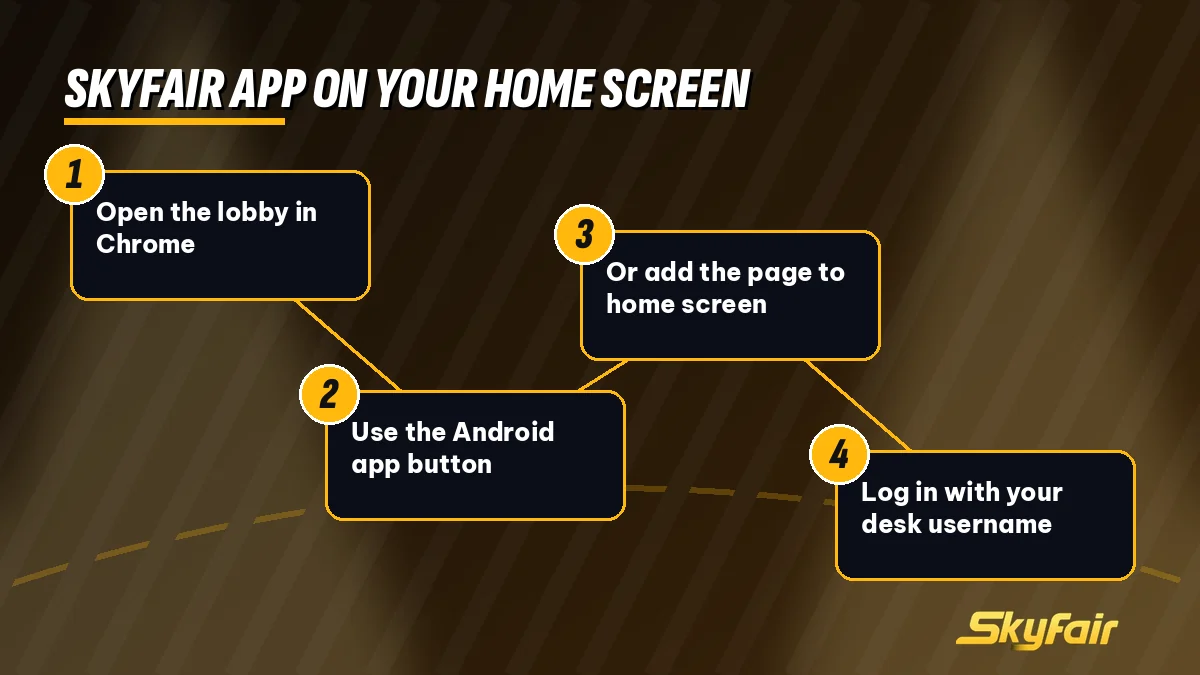
On Android the same trick hides in Chrome, a phone that refuses outside installs gets a SkyFair icon this way too, and the menu wording shifts a little between Chrome releases. Thirty seconds, roughly.
One catch, and it is the reason this route needs a little care. The shortcut remembers the exact addess it was made from, and betting domains get blocked in India from time to time, so if the SkyFair address behind your icon stops answering one morning, the icon will simply show a blank page or a browser error rather than the lobby you expect. Fix: delete the icon, open whichever official SkyFair address works today, add it again. Your SkyFair ID and balance carry over untouched, because they live on the account, not on the address.
| Address (17 Oct 2026) | Good for a SkyFair app shortcut? |
|---|---|
| skyfairinr.com | Yes, the official SkyFair lobby |
| www.skyfair.biz | Yes, opened with the www prefix |
| skyfair.bet | Yes, same lobby family as .biz |
| skyfair.live | No, a different operator style aimed at Bangladesh |
The table is a snapshot from one day; addresses come and go. The SkyFair live page explains why that last address is not the India lobby.
SkyFair App Login and Quick Stakes — Fast Mobile Betting Setup
Nothing new to learn at the door. The SkyFair app reuses the stadium-photo sign-in with its Powered by betfair line, and the only entry that catches mobile users out is the Validation Code: four digits printed next to the box that you retype yourself (6140 on one visit, something else the next). Username and passowrd behave as they always do, with an eye icon if you want to see what you typed.
Type slowly on a small keyboard. Most failed app logins are a wrong digit in that code, not a wrong password, and the code changes after each try, so reading it again before the second attempt saves a lot of guessing. If the password itself is the problem, the reset path sits with the SkyFair login pages rather than here.
After sign-in, one setting is worth touching before the first bet on a phone. Quick Stakes. It lets you save a few stake amounts and tap one instead of typing on the slip, which on a five-inch screen during a fast over is the difference between getting the price and missing it. The SkyFair lobby code also carries Accept Any Odds, Accept Any Price and Highlight when odds change; what each does is laid out on the SkyFair betting settings page, so set them there once and the app follows.
Desk noteSettings sit on the account, not the install. Change Quick Stakes in the browser and the SkyFair app shows the same values next time it opens.
SkyFair App Bottom Bar — Live Sports, Games and Account in Reach
Everything in the SkyFair app hangs off the strip along the bottom edge. Six items, left to right as the official lobby showed them on 17 Oct 2026, and the same order on the SkyFair247 lobby.
- Games: a chip that opens the casino side: Aviator, Evolution, Ezugi, Andar Bahar, Dragon Tiger and the rest of the SkyFair tiles, each with a Play Now tab.
- Sports: the full sports list; on that afternoon the LIVE card read Cricket 10, Soccer 19, Tennis 17, and those counts move all day.
- In-Play: only events already running. Details on the SkyFair live betting page.
- Home: back to the promo slider and sports card.
- Multi Markets: markets you pinned, side by side, handy when two matches overlap.
- Account: balance, statements, settings and logout.
Thumb reach is the whole point. On a tall phone the header is a stretch for one hand, while the bar sits right where the thumb rests, so most people end up living between In-Play, Multi Markets and Account and barely scroll the SkyFair home at all, which is fine (the home page is mostly banners anyway).
Lost? Tap Home.
The browser version of SkyFair carries the same strip on a phone-width screen, so moving from the shortcut to the APK, or back, does not mean learning a new layout. Same six items, same places.
SkyFair App Install FAQ — Trusted Answers for Phone Users
How do I download the SkyFair app APK on Android?
Get it from the download image inside the official SkyFair lobby, which answered at skyfairinr.com on 17 Oct 2026. Chrome saves the package to Downloads; Android then asks you to approve that one outside source before Install appears. The whole run usually takes a couple of minutes on a normal connection.
Is the SkyFair app available on Google Play?
No official SkyFair app was found on Google Play. A listing with a similar name there is a calculator from another developer, not the betting lobby. Take the APK from the download image inside the official SkyFair lobby, or use the home-screen shortcut, which needs no store at all.
Can I use the SkyFair app on an iPhone?
Yes, though not as a downloaded file, since iOS rejects outside packages. Safari builds the SkyFair app icon for you from the share sheet in about half a minute, and that icon then opens the lobby without the address bar, using the ID you already hold.
Is the SkyFair app safe to install?
The safer copy is the one you download yourself from the official SkyFair lobby button, not from third-party APK listings found in search. Allow outside installs only for that one file, and switch the permission off again afterwards if you prefer. The home-screen shortcut avoids the question entirely, since nothing is installed.
Does the SkyFair app use the same ID and balance as the website?
Yes. Money and bets are tied to your SkyFair account, never to the install, so the APK, a Safari icon and Chrome on a laptop all show one balance. Quick Stakes saved on one device turn up on the others the next time they open, with no sync step needed.
Why does my SkyFair app shortcut show a blank page?
Most likely the address it was saved from has been blocked, which happens to betting domains in India from time to time. Delete the icon, open an official SkyFair address that works today, and add it to the home screen again. Your ID and balance stay exactly as they were.
Is SkyFair 99 download different from the SkyFair app?
No. SkyFair 99 download is simply how many people search for the app, after the skyfair99 name. It points to the same Android package from the official lobby and the same SkyFair account, with the same bottom bar of Games, Sports, In-Play, Home, Multi Markets and Account.
What do I need before I open the SkyFair app for the first time?
Credentials, mainly. Installing the SkyFair app before having an account leaves you staring at a locked form, so sort the account first through the free WhatsApp desk, which takes about 2 minutes. Keep the username somewhere handy, because the phone keyboard is where most first-launch mistakes happen.